Fixing Random Audio Popping on Linux (Realtek ALC887-VD, AMD Family 17h)
I ran into an annoying audio issue on my desktop PC running Debian 13 with GNOME. Actually the problem is actually independent from the distro, desktop environment or the kernel. I experienced the same problem on the same hardware over years with different distros. The problem was so annoying so that on Linux I have been using the sound output of my monitor over Display Port or HDMI.
The onboard audio (Realtek ALC887-VD codec on an AMD Family 17h chipset) kept popping, and in GNOME the output device would disappear and reappear for a split second. Audio never fully stopped, but the random pop + device flicker made the system frustrating to use.
The same hardware worked perfectly under Windows, so I focused on Linux-side debugging.
Symptoms
Random popping / clicking sounds during playback
GNOME sound output device briefly disappearing
No useful logs in
dmesg,journalctl, PipeWire, or WirePlumberProblem looks independent from CPU load. Higher load doesn’t mean more frequent popping
aplay -lalways stable (ALSA still sees the device)
This looked like momentary device resets but without any kernel error messages. Since it is independent from CPU load and works fine on Windows, it shouldn’t be related to a “real” hardware problem or a DMA issue (?).
Fixes That Did Not Solve the Issue
Many posts on the internet and LLMs (like ChatGPT) suggests tweaking the power saving options but those ones didn’t work for me.
Root Cause: Faulty Front Panel Jack Detection
This Reddit post solved my problem:
After a lot of checking, the real cause turned out to be broken or noisy front panel jack detection.
Here is my 2 cents: Some Realtek codecs (including ALC887-VD) continuously poll the front jack pins. If the case wiring is low quality or noisy, the codec falsely detects a “jack plugged/unplugged” event which causes PipeWire to recreate the node and GNOME to briefly flash the volume popup. Not sure why this isn’t a problem on Windows, may be a difference in a driver or a configuration?
Working Solution: Disable Front Panel Jacks Using HDAJackRetask
On Debian based distro, first install HDAJackRetask
sudo apt install alsa-tools-gui
then run
hdajackretask
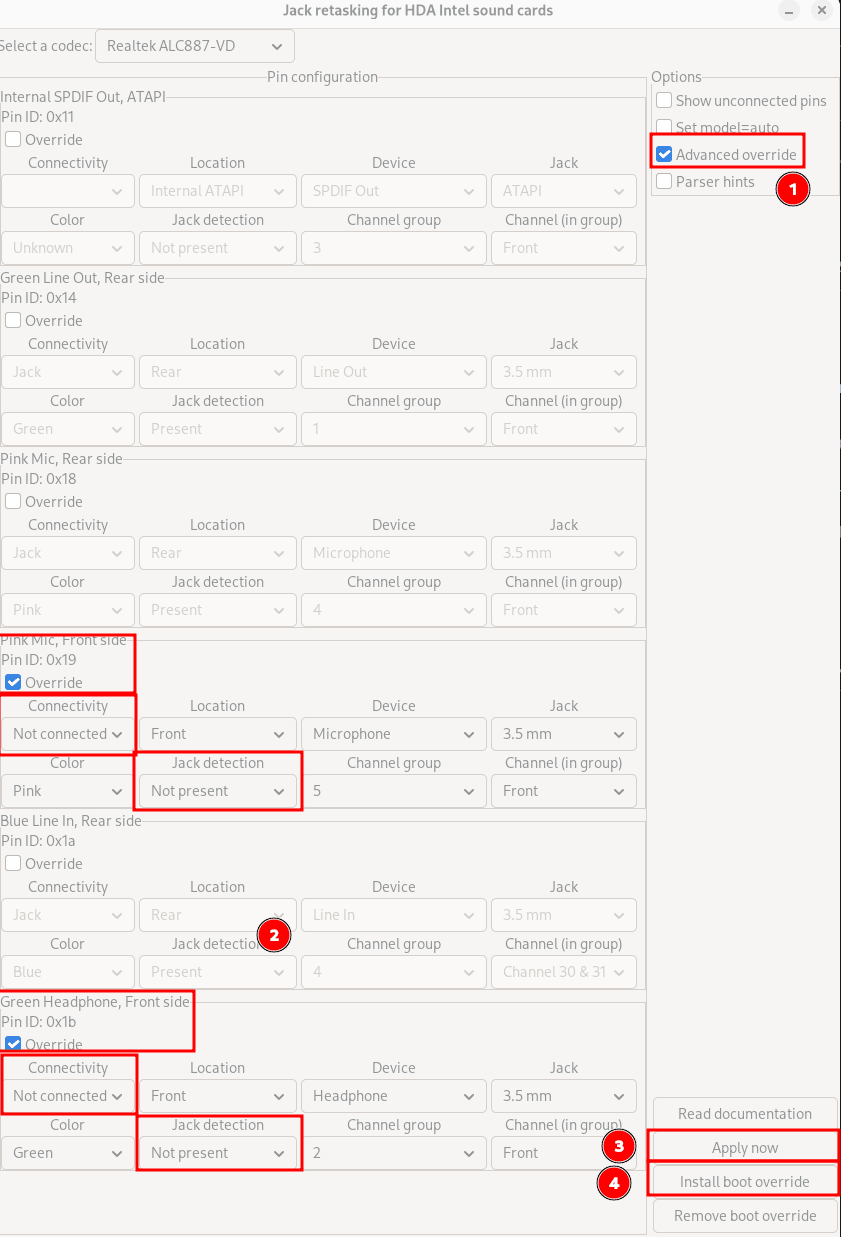
Now, according to the Reddit post apply the following settings. I am using the back green output jack for my speaker and not using the front panel, the shown settings are fine for me
HDAJackRetask
Open Advanced override, do the necessary settings. First click Apply now
button. This solved my issue immediately without rebooting. If you are happy,
then Install boot override to make it permanent. If you are curious then start
analyzing from /etc/modprobe.d/hda-jack-retask.conf